Key Takeaways
- Anatomical Physics: Smart rings offer superior resting heart rate accuracy during sleep due to stable finger arteries, while smartwatches excel at daytime activity tracking despite motion artifacts. Earbuds provide high accuracy but fail at all-night comfort and battery life.
- The Overlap Dilemma: Wearing multiple devices simultaneously causes conflicting data streams in Apple Health and Google Health Connect, often leading to erratic morning recovery scores if priority isn’t manually set.
- Source Prioritization (iOS): iPhone users must navigate Apple Health > Profile > Devices > Data Sources & Access to manually rank their preferred master device for Sleep and Heart Rate.
- Source Prioritization (Android): Android users must establish hierarchy within Google Health Connect settings, specifically prioritizing the desired app under the ‘Sleep’ and ‘Heart Rate’ data categories.
- Use-Case Strategy: Successful multi-device ownership requires a rotation strategy: use a smartwatch for GPS workouts, earbuds for calls, and a smart ring for frictionless nocturnal recovery tracking.
Understanding the Multi-Device Data Clash with Earbuds Included
Smart Ring vs Smartwatch vs Earbuds heart rate and sleep tracking is the technical evaluation and data reconciliation process between finger-mounted optical sensors, wrist-based biosensors, and in-ear audio monitors used simultaneously to measure physiological recovery metrics.
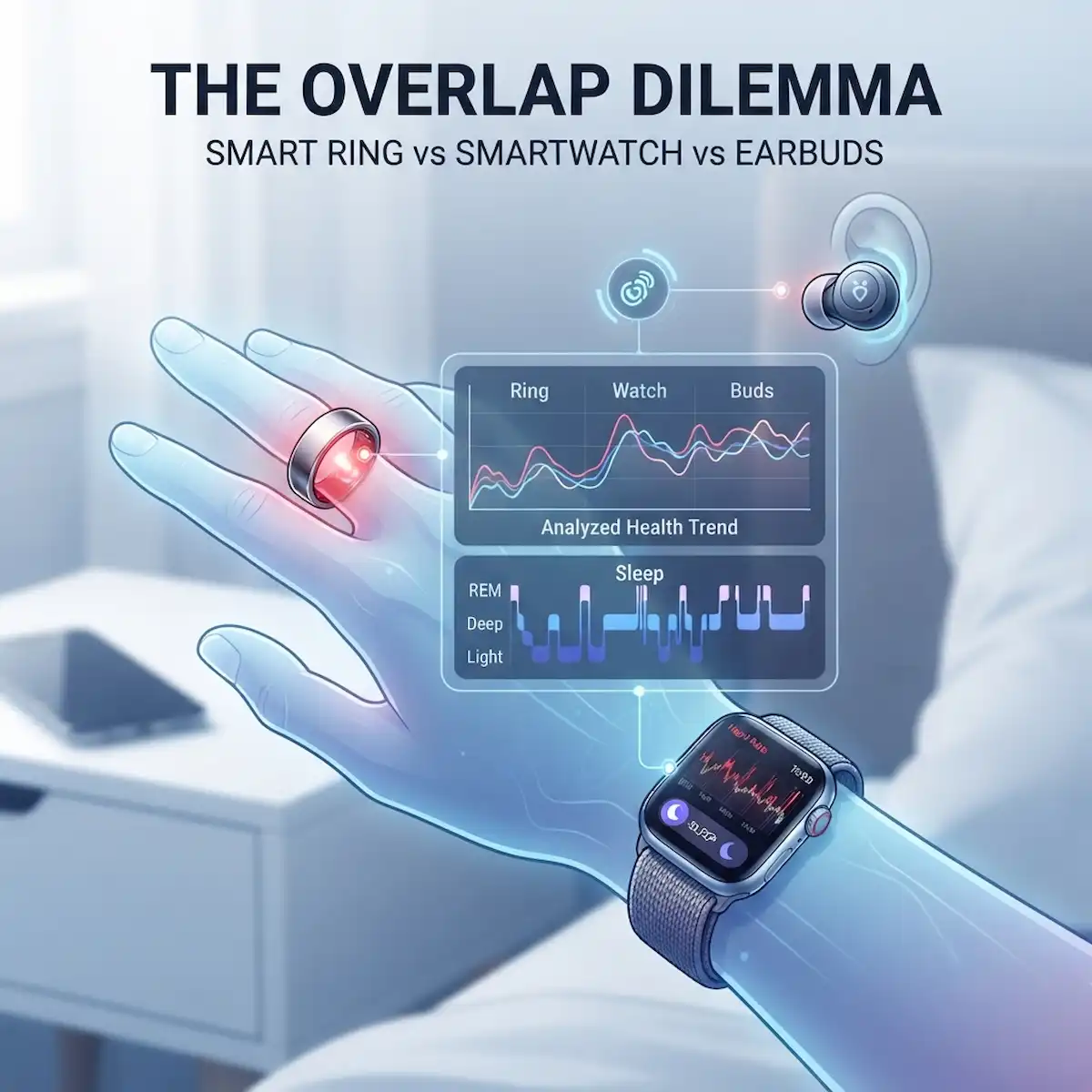
It happens in almost every modern household drawer. You charge your phone next to your bed, but on your nightstand sit three different health-monitoring gadgets. When evaluating smart ring vs smartwatch vs earbuds heart rate and sleep tracking, you slip on a titanium band before bed, strap a large OLED display to your left wrist, and leave biometric audio buds charging nearby. When you wake up, your wrist gadget says you slept for seven hours and forty minutes, your finger band insists you slept for six hours and twenty minutes, and your audio log suggests completely different night trends. Which number do you trust? This discrepancy is the physical manifestation of the multi-device overlap dilemma.
For years, people treated health tracking as a solitary gadget affair. But as sleek titanium finger bands from brands like Oura have flooded the market alongside wrist powerhouses from Apple and Samsung alongside biometric audio gear, mastering smart ring vs smartwatch vs earbuds heart rate and sleep tracking has become essential. People want the daytime utility of a wrist display combined with the frictionless night comfort of a finger band and the specialized audio utility of listening gear. The problem arises when these separate hardware suites feed conflicting metrics into a single health dashboard on your phone.
When your morning recovery score plunges because your finger band lost contact while your wrist display logged deep rest and your audio buds barely survived three hours of standby power, confusion sets in. You might restructure your entire day based on an algorithmic disagreement between three optical sensors. Perfecting smart ring vs smartwatch vs earbuds heart rate and sleep tracking requires understanding how different hardware locations capture physiological signals, how software platforms merge competing inputs, and how to configure your smartphone to establish a single source of truth.
How Does Smart Ring vs Smartwatch vs Earbuds heart rate and sleep tracking Actually Differ in Sensor Physics?
To understand why your gadgets disagree during smart ring vs smartwatch vs earbuds heart rate and sleep tracking sessions, you have to look past the marketing dashboard and examine the physics happening at the skin level. All three form factors rely primarily on photoplethysmography, abbreviated as PPG. This technique shines green, red, or infrared light through the skin and measures how much light reflects back or passes through as blood pulses through your arteries with every heartbeat. However, the anatomical real estate of your wrist, finger, and inner ear creates entirely different engineering challenges.
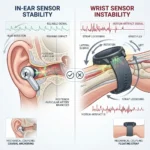
Your wrist is a high-motion zone packed with tendons, bones, and relatively thin subcutaneous fat layers over moving joints. Every time you type on a keyboard or shift your arm beneath your blankets, your wrist display shifts around, creating motion artifacts that can trick the sensor during smart ring vs smartwatch vs earbuds heart rate and sleep tracking checks. Your finger, by contrast, is a vascular goldmine with dense capillary beds and larger digital arteries running close to the skin surface, maintaining a snug fit against temperature fluctuations.
Your inner ear, monitored by biometric earbuds, represents a fascinating middle ground. The ear canal is surrounded by dense vascular networks fed by the external carotid artery, offering a stable environment with thin skin. Yet, earbud sensors face a major physical hurdle: physical displacement. If you shift your head on a pillow, the earbud shifts or loses its tight acoustic seal against the ear canal wall, causing immediate signal dropouts that disrupt smart ring vs smartwatch vs earbuds heart rate and sleep tracking results.
Which Form Factor Delivers Superior Sleep Staging and Recovery Metrics Across All Three Options?
When evaluating your nocturnal rest during smart ring vs smartwatch vs earbuds heart rate and sleep tracking comparisons, consumer hardware does not actually peer directly into your brainwaves. Instead, they run proprietary machine learning models trained on sleep lab studies, processing indirect proxies: movement via accelerometers, pulse-to-pulse intervals via optical sensors, and skin temperature variations.
Wrist displays hold a distinct advantage when it comes to raw processing power and battery longevity for complex nocturnal sensing. A modern wrist computer can fire off green and infrared LEDs at high sampling frequencies all night long. Finger bands counter this by leveraging superior placement ergonomics, virtually imperceptible to the user during sleep.
Audio earbuds occupy a frustrating niche for smart ring vs smartwatch vs earbuds heart rate and sleep tracking routines. While internal ear canal sensor physics are accurate when seated properly, the physical design makes overnight wear painful for side sleepers. Furthermore, keeping continuous optical heart rate and accelerometer systems active inside a tiny earbud chassis exhausts the battery within hours.
| Feature Comparison | Finger Band Hardware | Wrist Display Hardware | Audio Earbud Hardware |
| Primary Placement | Proximal phalanx of index, middle, or ring finger | Distal radius of wrist | External ear canal |
| Nocturnal Comfort | Extremely high; minimal snagging or weight | Moderate; can catch on bedsheets or press into skin | Poor; uncomfortable for side sleepers, short battery life |
| Vascular Access | High digital artery density; stable capillary beds | Moderate; higher motion artifact interference | High ear canal perfusion; highly stable if fitted right |
| Thermal Tracking | Direct palmar skin temperature sensing | Ambient or superficial wrist temperature sensing | Internal core temperature approximations |
| Primary Limitation | Peripheral vasoconstriction during cold nights | Motion artifacts during active sleep and daytime movement | Short continuous battery life; loose seal risks |
How Can You Configure Android to Stop Data Conflicts Between Three Competing Form Factors?
If you carry an Android phone, you have likely encountered the frustrating scenario where companion apps for your finger band, wrist display, and biometric earbuds all try to write sleep sessions and heart rate averages into your central database at the exact same time. Without manual intervention during smart ring vs smartwatch vs earbuds heart rate and sleep tracking syncing, Google Health Connect might accept partial sleep sessions from your earbuds while recording step counts from your wrist display and heart rate from your finger band.
Resolving this requires diving into your system settings to establish a strict data hierarchy. You need to designate one primary device as your master source for nocturnal metrics while relegating secondary and tertiary hardware to supplementary roles, ensuring clean smart ring vs smartwatch vs earbuds heart rate and sleep tracking analysis.
| Setup Step | Action Required on Android | Purpose |
| Step 1 | Open system settings and navigate to Apps, then find Health Connect. | Accesses the central data aggregation hub on your Android device. |
| Step 2 | Tap on Data access and permissions, then select Sleep. | Opens the specific biometric category where duplicate entries collide. |
| Step 3 | Review the list of connected apps writing sleep data to your database. | Identifies which hardware manufacturers are actively competing for priority. |
| Step 4 | Tap Add priority or reorder the listed apps by dragging your preferred master device to the top position. | Forces the operating system to honor your chosen hardware as the definitive source of truth. |
| Step 5 | Repeat this process for Heart rate, Blood oxygen, and Skin temperature categories across all device apps. | Ensures complete synchronization across all overlapping physiological metrics. |
How Can You Configure iPhone to Resolve Multi-Device Data Overlap Across Your Devices?
Apple users face a similar architectural challenge, though Apple Health handles incoming data through a sophisticated priority queue rather than an open aggregator. When your finger band, wrist display, and audio earbuds all feed data into your phone, Apple Health needs to know which stream of numbers to display on your dashboard widgets.
Leaving this on default settings often leads to erratic morning scores because the operating system might alternate between devices. By taking control of your data sources, you ensure that smart ring vs smartwatch vs earbuds heart rate and sleep tracking comparisons remain consistent day after day, giving you actionable trends rather than random data noise.
| Setup Step | Action Required on iPhone | Purpose |
| Step 1 | Open the Health app and tap your profile picture in the top right corner. | Accesses your personal account management and privacy configurations. |
| Step 2 | Scroll down and tap on Devices to see every hardware companion app installed on your phone. | Displays all active data contributors currently linked to your health database. |
| Step 3 | Tap into a specific biometric category, such as Sleep or Heart Rate, via the Browse tab. | Navigates to the raw data stream where conflicts occur. |
| Step 4 | Scroll to the bottom of the data metric page and tap Data Sources & Access. | Reveals the exact hierarchy of apps contributing to that specific metric. |
| Step 5 | Tap Edit in the top right corner and drag your preferred master app to the top of the list, then tap Done. | Instructs the operating system to prioritize your chosen hardware for all future calculations. |
Why Do Industry Insiders Know That Audio Earbuds Are the Ultimate Wildcard in Biometric Monitoring?
While the public debate focuses heavily on the choice between a finger band and a wrist display, hardware engineers working inside major audio and consumer electronics firms quietly point to earbuds as the most physically promising sensor location that suffers from practical design limits. Devices like specialized fitness earbuds or hearing-health audio gear contain high-precision optical sensors positioned directly inside the ear canal.
Industry insider knowledge reveals that the ear canal is one of the most stable anatomical locations for measuring core physiological data during waking hours. Unlike the wrist, which slides around during arm movements, or the finger, which suffers from vasoconstriction in cold weather, the inner ear is surrounded by dense vascular networks. In targeted clinical trials, in-ear optical sensors often match the accuracy of chest strap electrocardiogram monitors more closely than wrist displays can manage during stationary activities.
So why don’t people rely on them for round-the-clock tracking? The reality of consumer comfort and engineering trade-offs makes it impractical. Sleeping with rigid plastic or silicone tips jammed into your ears causes physical discomfort, especially for side sleepers. More importantly, tiny audio housings lack the physical space for large batteries. Running continuous optical heart rate sensors, accelerometers, and Bluetooth transmitters drains a typical earbud battery in under six hours, meaning the device dies halfway through the night.
This hardware limitation highlights why mastering smart ring vs smartwatch vs earbuds heart rate and sleep tracking requires a nuanced approach. Earbuds excel at intermittent daytime workouts and passive listening, but they cannot replace the all-night stamina required for comprehensive recovery analysis.
What Are the Real-World Use Cases for Combining Multiple Hardware Form Factors?
Multi-device health hardware deployment in smart ring vs smartwatch vs earbuds heart rate and sleep tracking is the strategic, simultaneous use of complementary physical form factors to maximize data capture fidelity across varying daily activities without incurring user friction.
Understanding the technical differences between these devices leads directly to practical application. Different daily routines demand different hardware strategies. Instead of viewing the overlap dilemma as a competition where you must discard two devices, many advanced users adopt a multi-device rotation strategy tailored to specific lifestyle scenarios.
Consider the avid distance runner or weightlifter who also listens to podcasts during commutes. During intense daytime training sessions, a wrist display is indispensable for real-time pacing and GPS tracking, while your biometric earbuds stream audio and track cadence. A finger band during a heavy barbell deadlift risks structural damage, and its optical sensor can experience motion clipping during rapid wrist flexions.
Conversely, when the workout ends and the evening winds down, the bulky wrist display and audio charging case go on the nightstand, eliminating screen glare and battery drain. The lightweight titanium finger band slides onto the finger, quietly capturing nocturnal temperature shifts, respiration rates, and overnight heart rate variability without disturbing your rest.
| Use Case Scenario | Recommended Primary Hardware | Secondary Hardware Role | Strategic Rationale |
| Intense Athletic Training | Wrist Display + Audio Earbuds | Finger Band (Charging) | GPS tracking, real-time visual zone alerts, audio feedback, and high-motion durability. |
| Nocturnal Recovery Tracking | Finger Band | Off-Wrist / Off-Ear | Unmatched sleep comfort, zero screen glare, and lower weight impact on circadian rhythms. |
| Office & Professional Work | Finger Band + Audio Earbuds | Stowed in gym bag | Discreet profile under professional attire while maintaining background step counting and audio utility. |
| Travel & Commuting | Audio Earbuds + Wrist Display | Active dual-sync | Managing calls, listening to media, and tracking transit metrics alongside basic daily activity. |
Frequently Asked Questions
Can I wear a smart ring, a smartwatch, and biometric earbuds at the same time without messing up my health data?
Yes, you can wear multiple devices simultaneously, but you must configure your smartphone operating system—using Google Health Connect on Android or Apple Health on iOS—to designate one primary device as your master data source. Without this priority hierarchy, duplicate entries will cause conflicting health scores.
Why do my smart ring, smartwatch, and earbuds show different sleep or heart rate numbers?
The disparity stems from different sensor locations, proprietary algorithmic scoring formulas, and varying tolerances for motion artifacts. Finger bands measure stable digital artery blood flow, wrist displays process higher motion interference, and earbuds measure inner ear blood flow with distinct acoustic movement profiles.
Which device is more accurate for resting heart rate during sleep?
Finger bands generally offer superior resting heart rate accuracy during sleep because the finger experiences less tendon movement and maintains a more stable optical coupling against the skin compared to a shifting wrist display or earbuds that risk dislodging on a pillow.
Do biometric earbuds track sleep as well as smart rings and smartwatches?
No. While in-ear sensor physics are highly accurate when seated properly, biometric earbuds suffer from short battery life that rarely survives a full night, alongside significant physical discomfort for side sleepers.
How do I stop my phone from doubling my step count when I wear multiple trackers?
You must open your phone’s central health management application, navigate to the step count data category, open the data sources list, and manually lower the priority of your secondary and tertiary tracking apps so that only your primary device contributes step totals to your daily tally.
Additional Helpful Information
- Learn more about cross device ecosystems – 3 Best Smart Device Ecosystems for 2026: iPhone vs Android
- Study about local earbud processin – Local Earbud Neural Processing for Noise Cancellation