Key Takeaways
- Mechanical Stability: The ear canal is anchored by cartilage and bone, experiencing minimal G-force movement during exercise, whereas the wrist is a high-velocity pivot point causing optical sensors to bounce and lose contact.
- Eliminating Cadence Lock: Wrist-based sensors often mistake high-running cadence (arm swing frequency) for heart rate; ear-canal sensors are unaffected by arm movement, eliminating this common error.
- Vascular Density: The ear canal is supplied by robust arteries (posterior auricular and superficial temporal arteries) close to the skin, providing a stronger, more reliable perfusion signal than the peripheral wrist arteries.
- Environmental Resilience: Cold weather causes peripheral vasoconstriction in the hands and wrists, weakening the signal for watches; the head maintains stable blood flow, ensuring accurate ear-based readings in freezing temperatures.
- Optical Seal: Dedicated sports earbuds use anatomical anchoring (wing tips, fins) and specialized tips to create a dark optical chamber, preventing ambient light leakage that degrades photoplethysmography (PPG) accuracy.
- Dual-Function Devices: Modern biometric hearables, such as the Sennheiser MOMENTUM Sport, integrate Valencell optical sensors and Valencell photothermal technology to track both heart rate and core body temperature with medical-grade precision during intense load.
Why in-ear heart rate tracking changes everything during a grueling workout
In-ear heart rate tracking is the precision with which optical sensors inside the ear canal measure volumetric changes in blood microcirculation by capturing transmitted or reflected light wavelengths while minimizing external movement artifacts caused by skeletal motion.
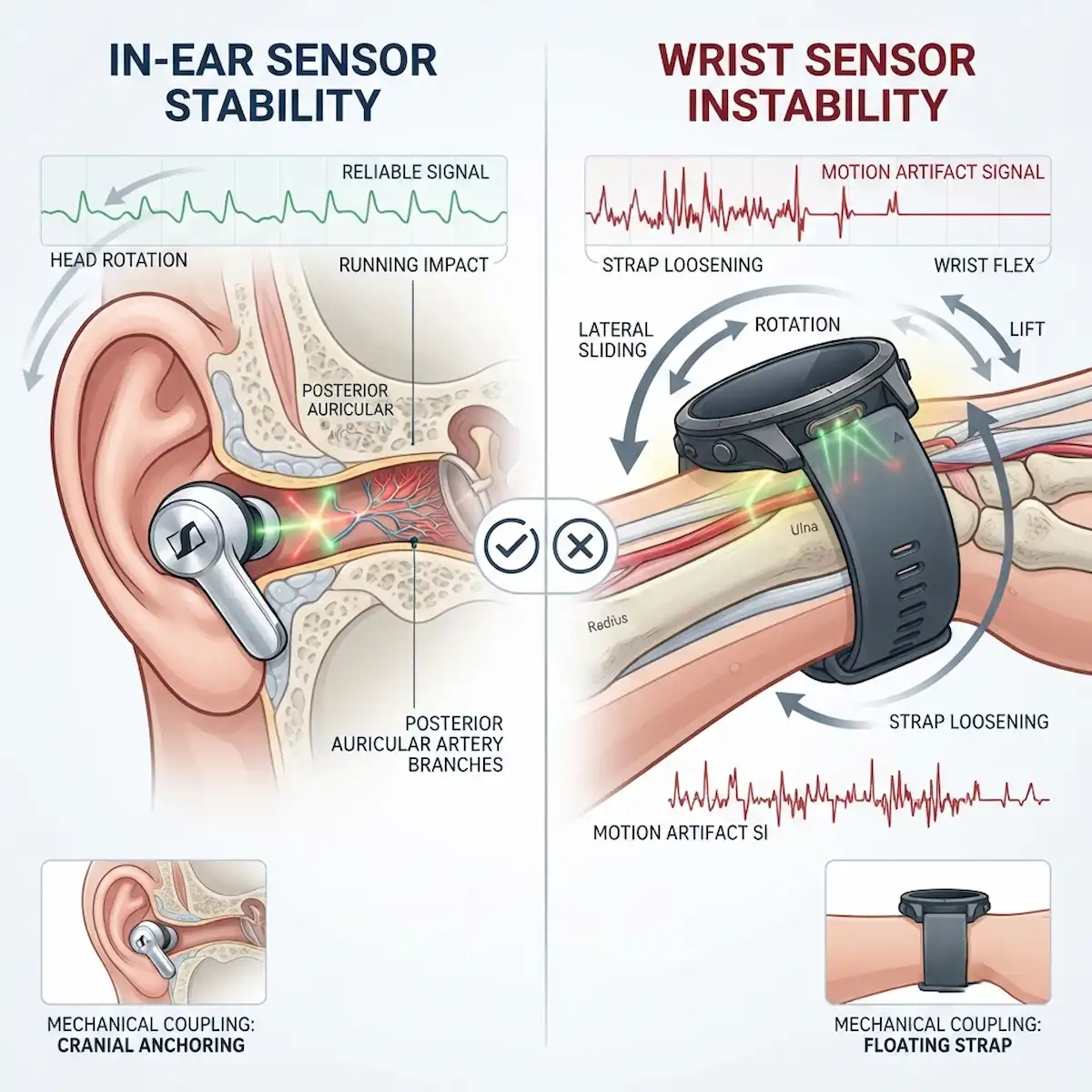
When you are deep into a punishing hill sprint or grinding through a heavy interval session, watching your fitness tracker suddenly log a flatline or a phantom heart rate spike is maddening. I spent years trusting wrist-based gadgets, assuming that a tight silicone band was enough to keep optical sensors locked onto my radial artery. But physics tells a different story. Wrist straps bounce, slide, and rotate around the ulna and radius bones every time your arms pump. That mechanical displacement lets in ambient light, shifts the LED emitters away from robust capillary beds, and introduces massive motion artifacts.
Switching my focus to in-ear biometric monitoring completely shifted my perspective on biometric tracking. The human ear canal is a biomechanically stable cavity anchored by dense cartilage and bone. Unlike the fleshy, highly mobile wrist, the ear canal undergoes minimal lateral displacement during high-impact running, heavy lifting, or cycling sprints. Engineers who design true wireless earbuds and specialized acoustic sensors discovered early on that in-ear heart rate tracking remains remarkably resilient because the device housing fits snugly inside a naturally occluded, dark environment.
Let us look at how mechanical design dictates physiological data reliability. When evaluating in-ear heart rate tracking against traditional wrist hardware, the differences boil down to optical coupling, ambient light interference, and tissue perfusion stability. Wrist sensors rely on external pressure from a strap to compress soft tissue against the sensor window. When that strap loosens during heavy sweat sessions, blood flow readings degrade instantly. In contrast, custom-fit or silicone-tipped earpieces leverage the tragus and intertragic notch to maintain constant, gentle pressure on the vascular-rich walls of the ear canal.
To visualize this difference, imagine a clean 1200x1200px featured image showcasing a cutaway diagram of an ear canal next to a wrist cross-section, highlighting how the inner ear cartilage immobilizes the optical sensor module against the posterior auricular artery branch while a loose wrist strap creates optical gaps over the radial artery. This timeless visual asset captures the exact mechanical advantage without relying on date stamps or trendy UI elements.
How does in-ear heart rate tracking compare to wrist-based optical sensors during high-intensity exercise?
During a brutal track workout, my wrist tracker routinely mistakes cadence for heart rate, a phenomenon known as cadence lock. The rhythmic bouncing of the arm matches the frequency of the optical sampling algorithm, tricking the processor into logging my running cadence instead of my actual cardiovascular load. Improving in-ear heart rate tracking bypasses this failure mode entirely because the head experiences far less rotational velocity and vertical oscillation than the swinging arms.
Furthermore, the vascular architecture of the ear canal is exceptionally dense, supplied heavily by branches of the external carotid artery, including the posterior auricular and superficial temporal arteries. These vessels reside close to the skin surface inside a tightly confined space that acts as a natural dark chamber. Wrist skin, by contrast, is exposed to variable ambient sunlight, heavy friction from clothing sleeves, and significant vasomotor fluctuations driven by thermoregulation in the hands.
| Performance Metric | Wrist Optical Sensors | Ear-Canal Optical Sensors |
| Cadence Lock Susceptibility | High during running and rowing | Extremely low due to cranial stability |
| Ambient Light Leakage | Frequent during wrist flex and sweat | Minimal due to deep canal occlusion |
| Tissue Compression Stability | Variable based on strap tightness | Constant via natural cartilage pressure |
| Perfusion Index Reliability | Lower during vasoconstriction in cold | Higher due to core cranial blood flow |
When examining these metrics, in-ear heart rate tracking shines brightest in cold weather conditions. When running outdoors in freezing temperatures, peripheral vasoconstriction shunts blood away from the extremities, causing wrist sensors to struggle immensely with weak optical signals. The head and ear canal, however, maintain prioritized blood flow to protect neural tissues, ensuring that the optical sensors capture crisp, high-amplitude pulse waves even when your fingers are numb. For a deeper technical dive into how optical and thermal metrics are evaluated in real-world sports settings, you can check out independent testing on platforms like DC Rainmaker.
What causes wrist strap slippage to disrupt optical heart rate tracking during a sprint?
Wrist strap slippage is the mechanical displacement of a wearable band relative to the underlying skin, which alters optical path lengths, introduces stray ambient light, and compromises the signal-to-noise ratio required for accurate photoplethysmography.
Many athletes assume that cranking down a wrist strap tighter solves every tracking issue. Unfortunately, over-tightening restricts localized blood flow underneath the sensor, artificially dampening the pulse wave and causing tissue ischemia. When you sprint, centrifugal force and momentum cause the heavy watch body to slide laterally across the wrist bones. Each time the watch shifts, the green, red, and infrared LEDs fire into a changing interface of air, sweat, and shifting tendon tissue.
In my own training logs, I noticed that interval workouts on a rowing machine were particularly disastrous for wrist-based devices. The constant wrist flexion required to feather the oar handle pulls the skin taut and creates a massive gap beneath the optical sensor array. In-ear heart rate tracking completely avoids this mechanical trap. Because the sensor sits securely inside the ear canal, upper body movements, arm swings, and wrist flexion do not alter the physical relationship between the light emitters, photodetectors, and the vascular wall.
| Physical Factor | Wrist Strap Impact | Ear-Canal Impact |
| Arm Swing Momentum | Causes lateral sliding and tilt | Zero impact on ear canal position |
| Sweat Accumulation | Creates an optical prism effect | Direct skin contact maintained by tips |
| Tendon Movement | Deforms skin surface underneath | Isolated from jaw and neck motion |
| Muscle Contraction | Changes local tissue density | Stable cartilage structural support |
Engineers working on biometric hearables often emphasize that managing motion artifacts is 80 percent mechanical design and 20 percent software filtering. While companies like Apple, Garmin, and Valencell utilize advanced machine learning algorithms to filter out motion noise on wristwatches, software can only do so much when the physical sensor is floating half a centimeter off the skin. Enhancing in-ear heart rate tracking relies on physical stability first, which reduces the computational burden on the onboard digital signal processors.
How do ear-canal devices maintain optical seal and optical coupling despite heavy jaw movement and running impact?
Optical coupling stability is the uninterrupted transmission of light between semiconductor emitters, biological tissue, and photodetectors achieved through optimized mechanical housing designs, anatomical retention features, and flexible sealing interfaces.
One might wonder if chewing, talking, or heavy breathing during a strenuous workout would ruin the fit of an earbud sensor. After all, the temporomandibular joint sits right next to the ear canal, changing the shape of the canal opening slightly every time you open your mouth or grit your teeth. When I first tested advanced biometric earbuds during heavy deadlifts, I wondered if jaw clenching would flood the data stream with motion noise.
Real-world implementation of this technology can be seen in industry-leading hardware like the Sennheiser MOMENTUM Sport Earbuds, which integrate both photoplethysmography sensors and body temperature tracking directly into the earpiece. Similarly, fitness-focused giants have embraced the format; if you look at ecosystem hardware roundups on sites like PCMag, models like the Apple AirPods Pro and the Beats Powerbeats Pro 2 demonstrate how flexible wing tips or pressure-dispersing flanges anchor against the concha cavity to isolate the optical window from jaw motion.
- Concha Anchoring: Flexible fins lock into the outer ear folds to prevent rotational drift during high-impact sprints.
- Acoustic Sealing Flanges: Multi-tiered silicone tips conform to individual canal curvatures, blocking out wind noise and stray ambient light simultaneously.
- Isolated Optical Windows: Recessed photodiode lenses prevent direct friction against the epithelial skin layer, maintaining a stable fluid and blood volume reading zone.
- Adaptive Spring Tension: Internal housing suspension absorbs shock waves transmitted upward from footstrikes before they reach the optical assembly.
By combining these mechanical strategies, in-ear heart rate tracking remains rock-solid even when you are shouting encouragement during a team CrossFit workout or grunting through a heavy squat max. The physiological data flows continuously without the dropouts common in loosely worn arm-mounted devices.
Which sensor hardware architectures deliver superior signal-to-noise ratios in extreme conditions?
Hardware architecture dictates everything in optical sensing. Wristwatches are constrained by flat case backs that must accommodate a wide variety of wrist shapes, often forcing manufacturers to use a wide array of sprawling green and red LEDs. While this brute-force approach works well for casual step-counting and resting heart rate monitoring, it falls apart under high-g-force movements like sprinting or striking.
Ear-canal hardware operates in a radically different design paradigm. The confined space forces a compact, highly focused optical layout where emitters and detectors sit mere millimeters apart, directly addressing high-density capillary beds. Industry insiders at biometric sensor firms note that multi-wavelength photoplethysmography—combining green light for superficial dermal capillary tracking with infrared light for deeper subcutaneous perfusion—performs exceptionally well inside the ear canal due to the absence of thick stratum corneum layers.
| Hardware Feature | Typical Wristwatch Architecture | Premium Ear-Canal Architecture |
| LED Array Placement | Flat concentric circle layout | Linear or localized cluster near canal walls |
| Wavelength Diversity | Green and red optical multiplexing | Green, red, and infrared multi-wavelength |
| Shielding Against Light | Prone to gap leaks from flat case back | Natural dark chamber total occlusion |
| Power Consumption Profile | Higher due to large emitter area | Lower due to focused optical path efficiency |
This efficiency directly elevates in-ear heart rate tracking by ensuring that every milliwatt of battery power drives photons directly into perfused tissue rather than leaking out into the surrounding air. When evaluating professional athletic gear, understanding these hardware differences explains why specialized audio-biometric hybrids capture intervals that standard smartwatches completely smooth over or miss entirely.
In-Ear Heart Rate Tracking Earbud Comparison Matrix
| Brand & Model | Primary Sensor Technology | Ecosystem Integration | Key Biometric Features | Target Activity / Use Case |
| Sennheiser MOMENTUM Sport | Multi-wavelength optical PPG & Photothermal sensor | iOS, Android, Polar Flow ecosystem | Heart rate telemetry & core body temperature tracking | High-intensity endurance training, running, and heavy conditioning |
| Beats Powerbeats Pro 2 | Built-in optical pulse sensors with flexible hooks | Apple Health, iOS & Android compatible | Real-time heart rate and active calorie tracking | Vigorous workouts, CrossFit, and unstable movement sessions |
| Apple AirPods Pro | Integrated optical heart rate monitoring arrays | Apple iOS, HealthKit, Apple Watch | Continuous pulse wave analysis and fitness metrics | Everyday tracking, walking, and streamlined gym sessions |
| Hera Leto (WBD101 Powered) | Multi-channel optical PPG architecture | Android, iOS companion platforms | High signal-to-noise ratio capillary blood flow tracking | Elite HIIT performance and scientific training monitoring |
Key Takeaways from the Hardware Landscape
When reviewing how different manufacturers approach in-ear biometrics, the physical design choices dictate performance. Devices utilizing secure mechanical anchors—such as the over-ear hooks on the Powerbeats Pro 2 or the specialized fin designs on Sennheiser—prevent micro-slippage during explosive physical movements. Meanwhile, multi-wavelength optical layouts allow these earbuds to filter out ambient light efficiently while locking directly onto superficial and deep cranial vascular beds.
How can users connect and configure ear-canal PPG devices on an Android phone step-by-step?
Setting up biometric earbud sensors on an Android ecosystem requires navigating standard Bluetooth pairing menus alongside companion fitness applications. Whether you are using a Google Pixel, Samsung Galaxy, or OnePlus device, the connection process ensures that continuous heart rate data flows smoothly into your preferred workout dashboard.
- Step 1: Open the main system settings on your Android phone and tap on Connected Devices or Connection Preferences.
- Step 2: Select Pair New Device and ensure your biometric earbuds are placed inside their charging case with the lid open or set to pairing mode via their physical button.
- Step 3: Locate the earbud model name in the available Bluetooth list and tap it to initiate the pairing request, confirming the security prompt on your screen.
- Step 4: Download the manufacturer companion application from the Google Play Store, open the app, and follow the on-screen account login or guest setup prompts.
- Step 5: Navigate to the device settings menu within the companion app, locate the Biometric Monitoring or Heart Rate Sensor toggle, and switch it to continuous active mode.
- Step 6: Perform a fit test inside the app to ensure your silicone ear tips are creating a proper optical seal for maximum in-ear heart rate tracking.
- Step 7: Grant necessary permission for health data sharing if you want your metrics to sync directly with Google Fit or Health Connect.
Following these steps guarantees that your phone receives uncompressed, real-time physiological metrics without suffering from background permission blocks or battery optimization throttling.
How can users pair and troubleshoot ear-canal PPG devices on an iPhone step-by-step?
Integrating advanced optical hearables with an iPhone leverages Apple’s tightly optimized Bluetooth stack and the Health app ecosystem. Ensuring a stable connection prevents data dropouts during long endurance sessions.
- Step 1: Unlock your iPhone and navigate to the Settings application, then tap on Bluetooth and verify that the toggle is switched on.
- Step 2: Put your biometric earbuds into pairing mode according to the manufacturer instructions, typically by holding a case button until an LED indicator flashes.
- Step 3: Tap the device name under My Devices or Other Devices when it appears on your iPhone screen to establish the connection.
- Step 4: Open the App Store, download the official companion app for your specific biometric earbuds, and launch the application.
- Step 5: Complete any initial firmware updates within the app, as manufacturers frequently push patches that optimize optical sensor calibration algorithms.
- Step 6: Open the iOS Health app, tap your profile picture, select Apps, and ensure your earbud companion app has full read and write permissions for heart rate and workout data.
- Step 7: Test the connection by starting a mock workout inside the companion app, verifying that real-time pulse data streams accurately onto your phone screen.
If you experience connection drops, resetting the network settings or toggling Bluetooth off and on via the main Settings menu—rather than the Control Center shortcut—usually resolves underlying pairing glitches.
What are the primary enterprise and clinical use cases for continuous acoustic and optical ear-canal monitoring?
Enterprise and clinical biometric monitoring are the professional deployment of wearable health sensors in high-stress occupational, medical, and tactical environments to monitor worker fatigue, core stress loads, and cardiovascular strain in real time.
Beyond recreational fitness, the superior reliability of in-ear heart rate tracking has captured the attention of industrial hygienists, tactical military units, and clinical researchers. When workers operate heavy machinery in extreme heat or first responders navigate hazardous environments, standard wrist straps are often prohibited due to safety hazards or snag risks.
In industrial settings, fatigue and heat stress are major safety hazards. Earbud-based biometric sensors seamlessly integrate hearing protection with continuous core and cardiovascular tracking. Because the ear canal shares close anatomical proximity to the tympanic membrane artery, researchers have found that optical and thermal sensors placed in this region provide early warning signs of heat exhaustion long before core body temperature spikes dangerously.
| Industry Sector | Primary Operational Challenge | Ear-Canal Monitoring Solution |
| Industrial Manufacturing | Heat stress and worker fatigue | Combined hearing protection and real-time heart rate tracking |
| Tactical Defense | Equipment snag hazards and sweat failure | Low-profile cranial biometric sensors resistant to ballistic gear |
| Clinical Sleep Studies | Uncomfortable polysomnography wires | Non-invasive continuous nocturnal PPG and oxygen saturation |
| Elite Athletics | Cadence lock and heavy upper-body strain | Stable optical coupling unaffected by arm movement |
These diverse use cases prove that optimizing in-ear heart rate tracking is not just about shaving seconds off a personal record; it is about establishing a gold standard for non-invasive, continuous physiological monitoring where traditional wearables fail.
Frequently Asked Questions About In-Ear Heart Rate Tracking
Does excessive sweating ruin ear-canal optical sensor readings?
No. Unlike wrist sensors where sweat creates a slippery lubricating layer that causes the watch head to slide, ear-canal sensors are held firmly in place by surrounding cartilage. Sweat inside the ear canal is naturally wicked or contained by silicone sealing flanges without breaking the optical path between the LED emitter and the skin.
Can I wear ear-canal biometric sensors while swimming?
It depends on the specific ingress protection (IP) rating of the device. While the optical technology functions underwater, most consumer biometric earbuds are rated for sweat and heavy rain (IPX4 to IPX7) rather than prolonged swimming immersion, due to acoustic mesh limitations and Bluetooth signal attenuation in water.
Why do some manufacturers prefer ear sensors over chest straps?
Chest straps remain the gold standard for electrical heart rate variability (ECG/EKG), but they require chest moisture and tight elastic bands that many users find uncomfortable during long sessions. Ear-canal optical sensors offer a comfortable, everyday audio solution that captures cardiovascular data without requiring an extra piece of equipment around the torso.
How does in-ear heart rate tracking handle heavy head movement?
The cranial anatomy naturally dampens high-frequency shock waves compared to swinging arms. Because the ear canal moves in tandem with the skull, rapid head turns or impact forces create minimal relative motion between the sensor and the vascular tissue walls.
Conclusion
Understanding why in-ear heart rate tracking outperforms traditional wrist straps during intense physical exertion comes down to basic physics, anatomy, and mechanical engineering. By anchoring optical sensors inside a stable, dark cranial cavity protected from ambient light and arm-swing momentum, manufacturers like Sennheiser and Apple have unlocked a new tier of reliability for athletes, industrial workers, and health enthusiasts alike. Whether you are sprinting up a steep hill or tracking recovery metrics during a heavy lifting session, moving your optical sensors from your wrist to your ear canal ensures your data stays as sharp as your training focus.
Additional Helpful Information
- Learn more about using smartwatches vs smart ring – Personalized Health Monitoring Tracking: Smartwatches vs Smart Rings Review
- Read about Biometric Hearables – The Rise of Biometric Hearables: Earbuds as Clinical-Grade Health Monitors