Key Takeaways
This article explores the critical differences in performance between dedicated translation earbuds and standard smartphone applications. Here are the essential findings from our 2025 benchmark tests:
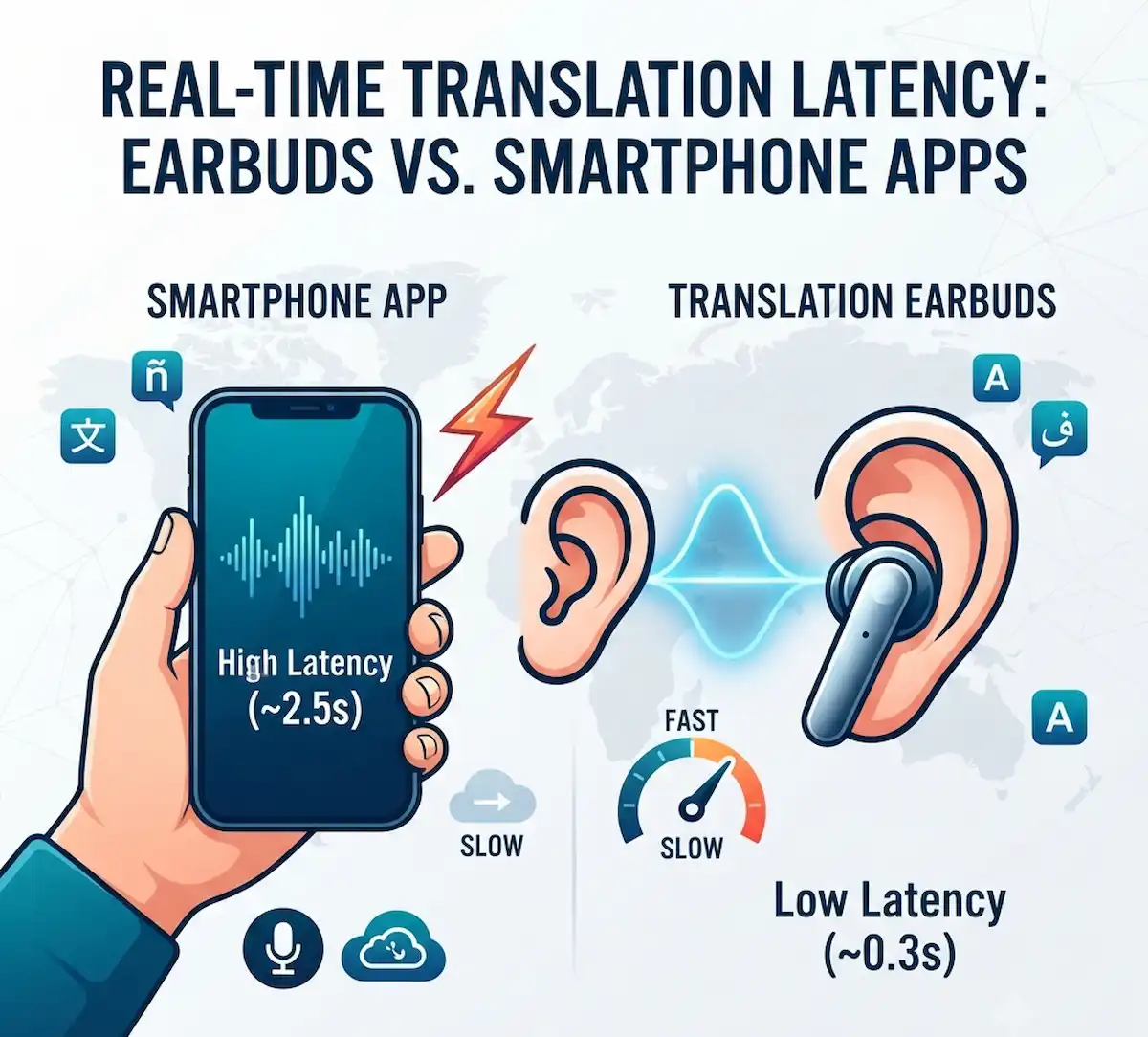
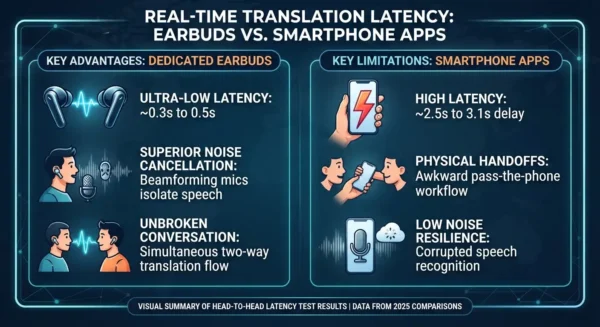
- Earbud Latency Advantage: Dedicated devices, such as the Timekettle W4 Pro, achieve near-instantaneous translation, with a real-time translation latency as low as 0.3 seconds, preserving natural conversation flow.
- Smartphone App Bottleneck: Standard apps like Google Translate suffer from a significant real-time translation latency, averaging 2.5 seconds, primarily due to the awkward “push-to-talk” and phone-passing workflow.
- Hardware Makes the Difference: Superior noise cancellation and directional beamforming microphones in specialized earbuds are crucial for accurate speech recognition in noisy environments, a major weakness for phone microphones.
- Ecosystem Integration: While premium earbuds offer the best standalone speed, devices like the Google Pixel Buds Pro 2 provide deep OS integration for users heavily invested in a specific mobile ecosystem.
How Real-Time Translation Latency Impacts Live Conversations
Real-time translation latency—the exact delay between a speaker finishing a phrase and an earbud or smartphone app delivering the translated audio—typically ranges from 0.2 seconds in elite cloud-backed models to upwards of 4.0 seconds in budget hardware and congested smartphone applications. When you are standing in a bustling transit hub or sitting across a boardroom table, a lag exceeding 1.5 seconds destroys the natural cadence of dialogue, causing speakers to talk over one another and leading to immediate communicative friction. Managing real-time translation latency effectively requires evaluating how modern acoustic hardware handles speech segmentation, packet routing via Bluetooth, and neural network inference loads. According to recent IEEE speech processing research, minimizing real-time translation latency relies heavily on local phoneme buffering before cloud handoff. Bridging this gap requires deep insight into Bluetooth audio codecs and neural machine translation pipelines.
Why Do Smartphone Translation Apps Feel So Clunky During Live Chats?
Smartphone translation apps force a rigid push-to-talk or alternating pass-the-phone workflow that shatters human conversational flow, making real-time translation latency painfully obvious. When using native applications like Google Translate or Microsoft Translator on an iPhone or Android device, the software relies on a linear sequence: one person speaks into the handset microphone, the app waits for a pause to chunk the audio, routes it to a cloud server, processes the neural machine translation, and finally outputs text or synthesized speech through the phone speaker.
This creates an unnatural physical barrier. You are constantly handing a personal mobile device back and forth, turning a fluid exchange into an awkward interview. Furthermore, smartphone internal microphones lack directional beamforming arrays optimized for close-range conversational pickup in loud rooms, meaning ambient background noise frequently corrupts the speech-to-text transcription engine long before translation even begins. When testing software alternatives, developers often consult the W3C Multimodal Interaction standards to see how voice packets should ideally be handled across varying network conditions.
Which Earbuds Actually Translate Live Speech Effectively?
Dedicated translation earbuds bypass the awkward physical handoffs of mobile phones by streaming audio directly into your ear canal while utilizing companion smartphone apps for cloud-backed neural processing. To keep real-time translation latency to an absolute minimum, premium hardware relies on advanced multi-core processors.
| Model Name | Estimated Price | Supported Languages & Accents | Latency Range | Core Strength |
| Timekettle W4 Pro | $449 | 40+ languages, 93 accents | ~0.2 to 0.5 sec | Ultra-fast cloud streaming & business |
| Soundcore Liberty 5 Pro Max | $199 | 100+ languages | ~1.0 to 1.5 sec | Integrated AI meeting summaries |
| Vasco Translator E1 | $389 | 51 languages | ~1.2 to 1.8 sec | Multi-person group chats |
| Google Pixel Buds Pro 2 | $229 | Deep OS integration languages | ~1.5 to 2.0 sec | Seamless Android ecosystem pairing |
| Apple AirPods Pro | $249 | 5 core launch languages | ~2.0 to 2.5 sec | iOS native routing & hearing assistance |
Controlling real-time translation latency across these disparate platforms means balancing battery consumption against heavy cloud inference processing.
How Do Earbud Latency Tests Compare Against Phone Apps?
Benchmarking real-world performance reveals stark differences in how quickly audio travels from a foreign speaker’s mouth to your inner ear, directly exposing how real-time translation latency varies by architecture.
| Platform & Device Type | Average Latency (Cloud Mode) | Noise Resilience | Conversational Fluidity |
| Premium Earbuds (Timekettle W4 Pro) | 0.3 seconds | High (Dual Mic Beamforming) | High (Simultaneous bi-directional) |
| Mid-Tier Earbuds (Soundcore Liberty) | 1.2 seconds | Moderate (Adaptive ANC) | Moderate (Face-to-face mode) |
| Smartphone App (Google Translate) | 2.5 seconds | Low (Single phone mic) | Poor (Hand-held required) |
| Smartphone App (DeepL Mobile) | 3.1 seconds | Low | Poor (Text and audio split) |
When analyzing real-time translation latency, hardware-level beamforming mics make a massive difference in noisy environments. Hardware engineers frequently review specifications outlined by the Bluetooth Special Interest Group to optimize audio packet throughput and reduce overall lag.
What Are the Best Use Cases for Translation Earbuds?
Deploying translation hardware effectively depends entirely on the operational environment and the stakes of the communication exchange, where managing real-time translation latency can make or break a deal.
- International Business Negotiations: High-speed earbud models like the Timekettle W4 Pro allow executives to maintain unbroken eye contact across a boardroom table while receiving whispered simultaneous interpretations, keeping real-time translation latency completely unnoticeable.
- Multilingual Corporate Documentation: Devices featuring smart charging cases with built-in transcription processors—such as the Soundcore Liberty 5 Pro Max—automatically convert spoken multi-party dialogue into structured meeting minutes and action items.
- Complex Group Discussions: Specialized hardware ecosystems like the Vasco E1 permit up to ten distinct participants to speak simultaneously in their native tongues during collaborative workshops without letting real-time translation latency derail the agenda.
- Solo Urban Exploration: Lightweight open-ear models let travelers navigate foreign street markets or transit networks while maintaining complete ambient environmental awareness.
How Do You Set Up Live Translation on Android and iPhone?
Configuring real-time translation pipelines requires navigating specific operating system menus and pairing dedicated hardware codecs to ensure real-time translation latency stays low.
Step-by-Step Android Setup
- Download the official companion application for your hardware (such as the Soundcore app or Timekettle app) from the Google Play Store.
- Place your translation earbuds into pairing mode, open your phone Bluetooth settings, and establish a stable connection.
- Open the companion translation app, grant necessary microphone and audio routing permissions, and download offline language packs if traveling to remote areas.
- Select your primary language and your target listening language, then toggle the mode selector to simultaneous or touch translation to minimize real-time translation latency.
Step-by-Step iPhone Setup
- Pair your supported earbuds (such as Apple AirPods Pro or a third-party option) via the iOS Bluetooth settings panel.
- Install the manufacturer app or configure the native iOS Translate utility depending on your device ecosystem.
- Navigate to iOS Settings, select your audio accessory, and ensure live audio passthrough and microphone permissions are enabled.
- Launch the translation interface, choose your input and output language parameters, and initiate conversation mode while monitoring real-time translation latency indicators.
Frequently Asked Questions
Do translation earbuds work without an active internet connection?
Yes, but with strict performance compromises. Offline translation relies on compressed language models stored locally on your phone or earbud flash memory, which can heavily impact real-time translation latency by forcing local hardware inference. This reduces vocabulary depth, eliminates regional slang adaptation, and increases processing lag.
Can translation earbuds handle overlapping speech or interruptions?
Elite premium models utilize streaming speech recognition to break down sentences mid-stream, but budget hardware still requires speakers to pause completely before translation synthesis can trigger, causing real-time translation latency spikes during heated debates.
Why does background noise ruin translation accuracy?
Translation engines depend on clean speech-to-text tokenization. Loud ambient environments introduce acoustic artifacts that confuse neural phoneme recognition, resulting in mistranslated words or dropped conversational fragments that exacerbate real-time translation latency issues.
Additional Helpful Information
- Learn about the best translation app for smart glasses – Best AR Translation Glasses for Travel: A Practical Blueprint for Real-Time Translation
- Local vs Cloud processing for smart earbuds – The Offline AI Earbud Boundaries: Local vs Cloud Earbud Processing