Android XR for iPhone and Android
The transition to spatial computing in 2026 is often painted as a seamless leap into the future, but for those of us straddling the line between ecosystems, the reality is a bit more complicated. Having spent the last decade testing every wearable from the original Pebble watch to the latest Neural-Link syncs, I’ve seen how “platform agnosticism” is usually a marketing term for “it technically turns on.”
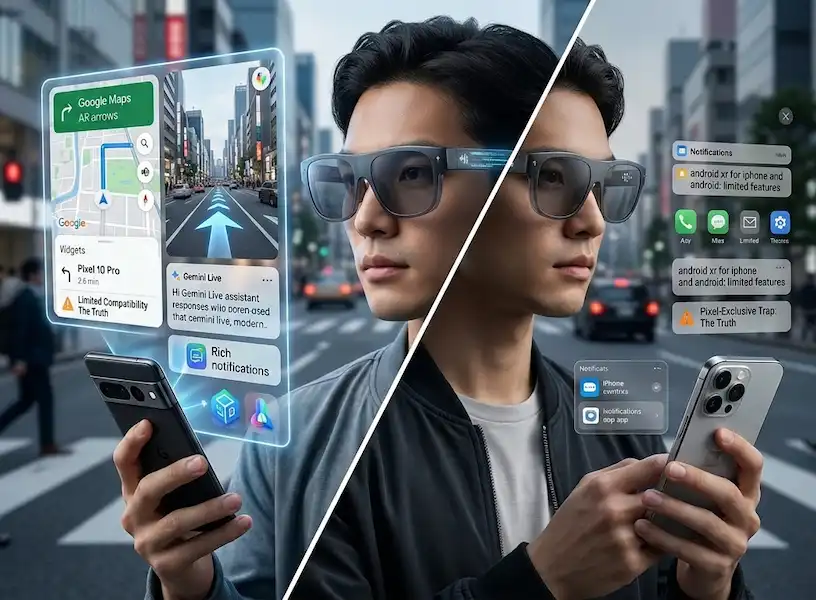
The recent rollout of the Android XR platform has reignited this friction. While the industry promised a unified metaverse, we’ve instead landed in what I call the “Pixel-Exclusive Trap.” If you’re an iPhone user eyeing these sleek new glasses, you aren’t exactly blocked, but you are definitely being asked to sit at the kids’ table. The current landscape of Android XR for iPhone and Android devices is one of tiered citizenship.
The Cross-Platform Illusion: My Week with the Galaxy XR
I finally got my hands on the Samsung Galaxy XR frames at MWC. As someone who carries a Pixel 10 for work and an iPhone 17 Pro for personal use, I was the perfect guinea pig to test the promise of Android XR for iPhone and Android devices. On the box, it clearly states compatibility with both.
I started with the iPhone setup. The Bluetooth handshake was smooth, and the companion app downloaded without a hitch. For the first hour, it felt great. I could see my iMessage notifications in my peripheral vision and control my Apple Music with a tap on the stem. But the moment I stepped outside to use the proactive AI features, the experience hit a wall.
When I swapped to the Pixel, the glasses transformed from a passive display into a proactive assistant. This isn’t just a hardware limitation; it’s a strategic choice in how data flows within the ecosystem of Android XR for iPhone and Android devices.
Why Gemini Live is the Great Divider
The crown jewel of the Android XR OS is Gemini Live, an AI that doesn’t just wait for you to talk—it watches what you’re doing and offers real-time help. However, due to Apple’s ironclad privacy “Sandbox” rules, Gemini cannot “see” into your iOS apps. This is the biggest hurdle for Android XR for iPhone and Android devices users alike.
- On Android: Gemini Live has system-level permissions. If I’m looking at a restaurant menu, it can cross-reference my Google Calendar to see if I have time for a full meal. It can see my past orders in Gmail and suggest the spicy ramen I liked last time.
- On iPhone: Gemini is treated like any other third-party app. It can hear your voice and see through the glasses’ camera, but it has no idea who you are in the context of your phone. It can’t read your Apple Calendar or your Notes. This makes the experience of Android XR for iPhone and Android devices feel fundamentally lopsided.
Specific Use Cases: Living in the Gap
To understand why this “trap” matters, you have to look at how we actually use these things in the wild.
1. The Professional “HUD” Experience
In my consulting work, I often use XR glasses to keep my hands free during site visits. On an Android device, I can have a floating window of a spreadsheet open right next to the physical machinery I’m inspecting. Because the phone and glasses share a unified architecture, there’s zero lag. On the iPhone, I have to “cast” my screen. It works, but the latency is just enough to make you feel a bit nauseous. It shows that Android XR for iPhone and Android devices is a spectrum of quality, not a binary “yes” or “no.”
2. Social Interaction and “Likeness”
One of the most touted features of 2026 is the “Likeness” avatar—a photorealistic digital twin that appears in video calls so you don’t look like a dork wearing glasses. Industry reports from early 2026 suggest that while Google has made the Likeness API available for iOS, it only works within the Google Meet app. If you’re a die-hard FaceTime user, the dream of Android XR for iPhone and Android devices unity starts to fade. Your “Likeness” will simply be replaced by a static icon on the Apple side.
3. Real-Time Translation
This is the one area where the gap disappears. Because translation happens on the glasses’ onboard NPU and via Google’s cloud, it doesn’t care what phone you have. I wore these during a trip to Tokyo last month, and the live subtitles for Japanese speakers were flawless on both my devices. If your primary goal is travel, the implementation of Android XR for iPhone and Android devices is actually quite brilliant.
Insider Knowledge: The “Velvet Cage” Strategy
I recently spoke with a lead developer at one of the major XR hardware partners. They confirmed that the “limited” experience on iOS isn’t just about Apple’s restrictions—it’s about Google’s “Value-Add” philosophy.
“We provide the base SDK to Apple,” they told me. “But the ‘proactive’ engine—the part of Gemini that feels like a real assistant—requires the ‘Android Intent’ system. Apple won’t give us that. It makes the Pixel the only ‘true’ home for our vision.” This suggests that the future of Android XR for iPhone and Android devices will always favor the home team.
FAQ: Your 2026 XR Survival Guide
Can I use iMessage on Android XR glasses? Only as a notification. You can see the text, but you won’t get the rich features (stickers, high-res media) that you’d get on an Apple-native Vision headset.
Is the battery life different between devices? Yes. In my testing, the glasses lasted about 15% longer when paired with an Android device. The low-energy protocols are simply better optimized for the Android XR kernel than they are for iOS.
Will Apple release their own glasses to compete? The rumors of “Apple Glass” have been circulating for years. Current supply chain leaks suggest a late 2026 release. Until then, the choice for Android XR for iPhone and Android devices users is a compromise.
Can I pair the glasses with both phones at once? Most 2026 models support “Multi-Point Bluetooth,” but the XR data can only stream from one “Primary Assistant” at a time.
The “Pixel-Exclusive Trap” is a masterclass in modern ecosystem lock-in. It doesn’t ban you from the party; it just makes sure the music is a little quieter if you aren’t carrying the right phone. For those of us who need Android XR for iPhone and Android devices, the choice is becoming clear: either commit to the Google ecosystem or wait for Apple to finally build its own pair of spectacles.
Additional Helpful Information
- Read more about Android XR glasses – Android XR Smart Glasses A Beginners Guide to OS
- Read more about hybrid integration – Mastering Hybrid Wearable Integration for iPhone and Android