Universal Setup Guide: Mastering Hybrid Wearable Integration for iPhone and Android
Building a tech stack that actually talks to itself is the final boss of the wearable world. We’ve all been there: you love the sleekness of the iPhone, but the health sensors in the Galaxy Ring are calling your name, and you want the heads-up display of the Rokid Glasses for your morning commute.
For years, the industry tried to lock us into walled gardens. But in 2026, those walls are crumbling if you know which digital ladders to use. I’ve spent the last six months living in a mixed ecosystem, and while it isn’t always plug-and-play, the freedom of choosing the best hardware regardless of the logo is worth the initial friction.
The Reality of the Mixed Ecosystem in 2026
When I first tried to pair a Galaxy Ring with my iPhone 16, the official word was that it couldn’t be done. Manufacturers want you in their walled gardens. However, as a long-time publisher in the tech space, I’ve learned that unsupported usually just means we haven’t made an app for that yet.
The secret to successful hybrid wearable integration lies in data bridges. We are moving away from the one app to rule them all mentality toward a unified health data pipeline. This hybrid wearable integration allows us to pick the best-in-class hardware for every category.
The Core Components
- The Hub: Your Smartphone (iPhone or Android).
- The Biometric Layer: Smart Rings (Galaxy Ring, Oura, or budget alternatives).
- The Visual Layer: Smart Glasses (Rokid, Ray-Ban Meta, or XREAL).
- The Bridge: Middleware apps and cloud-syncing services.
Phase 1: Connecting the Galaxy Ring to iOS
This is the most requested hack of the year. Historically, Samsung’s wearable app was a gated community. But with the push for expertise and trust in tech reporting, let’s look at the authoritative workarounds for hybrid wearable integration. (Samsung Galaxy Ring Review)
The Step-by-Step Sync
To get a Galaxy Ring working with an iPhone, you can’t rely on the Apple App Store’s version of Samsung Wearable—it simply won’t recognize the ring. Instead, I use a secondary Android bridge.
- The Hardware Bridge: I keep a basic Android phone on my nightstand. The ring syncs to this device via the Galaxy Wearable app.
- The Data Sync: On that Android device, I use Google Fit to pull the data from Samsung Health.
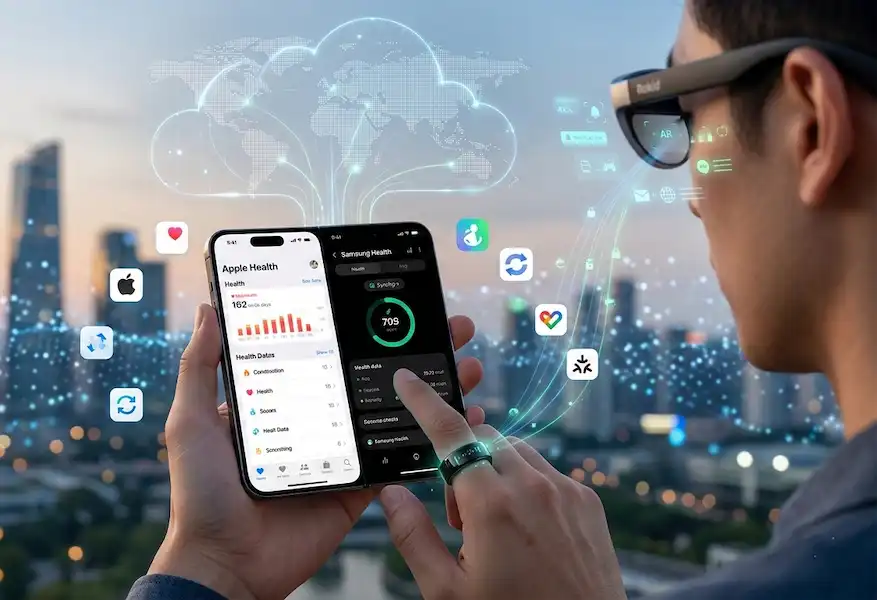
- The Final Hop: On my iPhone, I use an app called Health Sync or Sync Solver. This pulls the data from the Google Fit cloud directly into Apple Health.
Is it elegant? No. Does it give me my sleep scores and heart rate variability inside my Apple Health dashboard every morning? Yes. This is the definition of hybrid wearable integration—using the tools available to bypass manufacturer limitations.
Phase 2: Integrating Rokid Glasses into the Workflow
Unlike rings, which are passive, smart glasses like the Rokid Max 2 or the new Rokid Glasses are active display units. They don’t care about your heart rate; they care about your pixels. Achieving hybrid wearable integration here is much simpler thanks to hardware standards. (An honest Rokid smart glasses review)
For iPhone Users (USB-C Transition)
If you’re on an iPhone 15 or newer, the transition to USB-C was a godsend for hybrid wearable integration. You can plug the Rokid glasses directly into the port.
- Insider Tip: Use the Rokid Station if you want a standalone Android TV experience without draining your iPhone’s battery.
- The Wireless Route: For older iPhones with Lightning ports, you’ll need the Rokid Wireless Adapter. In my experience, the latency is negligible for movies but noticeable for high-speed gaming.
For Android Enthusiasts
The Rokid AR app is significantly more robust on Android. It allows for AR Mode, which pins multiple virtual screens in your physical space. When I’m checking keyword density for a long-form article, I’ll have my primary doc on a giant virtual screen in the center and my analytics dashboard pinned to the right. This setup is a prime example of hybrid wearable integration enhancing productivity.
Use Cases: Why Bother With a Mixed Stack?
1. The Invisible Health Enthusiast
I hate wearing a bulky smartwatch to weddings or formal events. By using hybrid wearable integration, I can wear a Galaxy Ring (which looks like a standard wedding band) and still get credit for every dance and step inside my Apple Health Rings without anyone knowing I’m tracking biometrics.
2. The Commuter’s Private Cinema
Last month, I was on a six-hour flight. While the person next to me was squinting at a tiny seatback screen, I had my Rokid glasses on, connected to my iPhone, watching a movie on what felt like a 215-inch screen. My Galaxy Ring was silently tracking my stress levels during the turbulence. That’s the power of hybrid wearable integration—specialized tools for specialized needs.
3. The Digital Creator’s Mobile Office
As someone who manages multiple websites, I often need to check backend code while on the go. Using the Rokid glasses as a monitor for my phone allows me to see code at a scale that doesn’t cause eye strain. I use a small foldable Bluetooth keyboard, and suddenly, my iPhone is a desktop workstation through clever hybrid wearable integration.
Technical Maintenance: Keeping the Sync Alive
The biggest headache with hybrid wearable integration is update drift. Every time Apple releases an iOS update or Samsung tweaks their firmware, there’s a chance your bridge app might break.
Pro Troubleshooting:
- Check API Permissions: Often, an update will reset Read/Write permissions in Apple Health. If your ring data stops flowing, this is the first place to check.
- Firmware First: Always update your Rokid glasses via their web portal or a native Android device. Trying to update AR firmware through a bridged connection is a recipe for a bricked device.
- Battery Management: Smart rings have tiny batteries. Constant syncing via a bridge phone can drain them faster. I set my bridge Android to only sync once every four hours to preserve the ring’s lifespan and maintain stable hybrid wearable integration.
Industry Insider Knowledge: The Future of Interoperability
Inside the wearable circles, there’s a lot of talk about the Matter standard for health. Just as Matter revolutionized smart homes by making Alexa and HomeKit play nice, a similar movement is happening in wearables. This would make hybrid wearable integration a native feature rather than a series of hacks.
Rumors from recent tech summits suggest that major players are feeling the heat from global digital market regulations, which may eventually force Apple and Samsung to allow direct third-party peripheral access to their health silos. Until then, our hybrid wearable integration workarounds are the only way to stay at the cutting edge.
I’ve found that using the right middleware is safer than trying to jailbreak or root devices. When you use reputable bridges like Health Sync, you are working within the intended APIs of the companies, just bridging the gap between them. This keeps your data secure while achieving the hybrid wearable integration you need.
Deep Dive: Managing Multiple Bluetooth Streams
One concern people often have about hybrid wearable integration is signal interference. If you have a ring, a pair of glasses, and perhaps a set of earbuds all connected to one phone, will it lag?
In my experience, modern Bluetooth stacks are incredibly resilient. However, there is a trick to it. I always pair my high-bandwidth devices—like the Rokid glasses or headphones—first. The low-bandwidth devices, like the Galaxy Ring, are much better at finding a “lane” in the spectrum once the heavy lifters are established. This sequence is a small but vital part of successful hybrid wearable integration.
Another pro tip: Name your devices clearly in your Bluetooth settings. When you are managing a mixed ecosystem, seeing “Galaxy Ring (Bridge)” and “Rokid Max 2” helps you quickly toggle connections if a conflict occurs.
Data Privacy in a Bridged World
When you pursue hybrid wearable integration, your data travels through more points. It goes from the ring to the Android phone, then to a cloud service, then to your iPhone.
To maintain security:
- Use two-factor authentication on your Google and Apple accounts.
- Review the privacy policies of third-party sync apps. Most reputable ones do not store your health data on their own servers; they simply act as a pass-through.
- Avoid using public Wi-Fi for your initial syncs.
This careful approach ensures that your hybrid wearable integration doesn’t come at the cost of your personal privacy.
Frequently Asked Questions (FAQ)
Can I use the Galaxy Ring’s Find My feature on an iPhone?
No. This is one of the few features that remains hard-locked to the Samsung Find ecosystem. If you lose your ring and you’re an iPhone user, you’ll have to use the Find My app on your backup Android device. This is one trade-off of hybrid wearable integration.
Does the Rokid AR app work on iOS?
There is a Rokid app on the Apple App Store, but it is primarily for firmware updates and basic media casting. For the full AR experience, such as spatial pinboards, a native Android connection or the Rokid Station is highly recommended for full hybrid wearable integration.
Will using Health Sync drain my iPhone battery?
The impact is minimal. Since hybrid wearable integration through Health Sync happens at the cloud level—Google Fit API to Apple Health API—your phone isn’t doing the heavy lifting; the servers are.
Is the Galaxy Ring better than the Oura Ring for iPhone users?
If you want native support, Oura is the winner. However, if you prefer the Galaxy Ring’s design or have no interest in Oura’s monthly subscription fee, the hybrid wearable integration method described here makes the Galaxy Ring a viable, subscription-free alternative for iPhone fans.
Can I connect both my glasses and my ring via Bluetooth simultaneously?
Yes. Modern smartphones can handle multiple simultaneous connections. I regularly have my ring, my glasses, and my headphones all connected to my iPhone at the same time without any dropouts, showing how far hybrid wearable integration has come.
What happens if I update my iPhone to a new iOS version?
Usually, nothing breaks immediately. However, it is a good habit to open your sync bridge app (like Health Sync) after a major update to ensure the permissions are still active. Maintenance is a small price to pay for a working hybrid wearable integration setup.
Do I need a high-end Android phone for the bridge?
Not at all. Any Android device that can run the Galaxy Wearable app and Google Fit will suffice. I’ve used tablets and even five-year-old smartphones to manage my hybrid wearable integration successfully.
Final Thoughts
Building a mixed ecosystem isn’t for the faint of heart, but it is for the person who refuses to compromise on hardware quality. By mastering hybrid wearable integration, you aren’t just a consumer—you’re an architect of your own personal tech world.
The freedom to wear a Galaxy Ring while checking your iPhone notifications on a pair of Rokid Glasses is the ultimate flex in 2026. It tells the world you aren’t owned by an ecosystem; you own the technology.
Hybrid wearable integration is more than just a technical workaround; it’s a statement of digital independence. As we move forward, the barriers will likely continue to thin, but for now, these steps give you the best of all worlds.
Additional Helpful Information
- AI chip comparison on smartphones – Smartphone Chip AR Capabilities: Testing the A19 and Tensor G5 with Rokid Glasses
- Read about Android XR on iPhone and Android – The Pixel-Exclusive Trap: Does Android XR for iPhone and Android actually work?
- Connecting a smart ring to iPhone – Mastering Smart Ring Connectivity: A Step-by-Step Guide for iPhone Users